 Tessera
The app that makes YouTube videos from scratch
For channels without your face on camera. Give it a topic — Tessera researches the facts, writes the script, draws every frame in your channel’s style, turns key scenes into real video, adds the voice and edits it all together. You just approve.
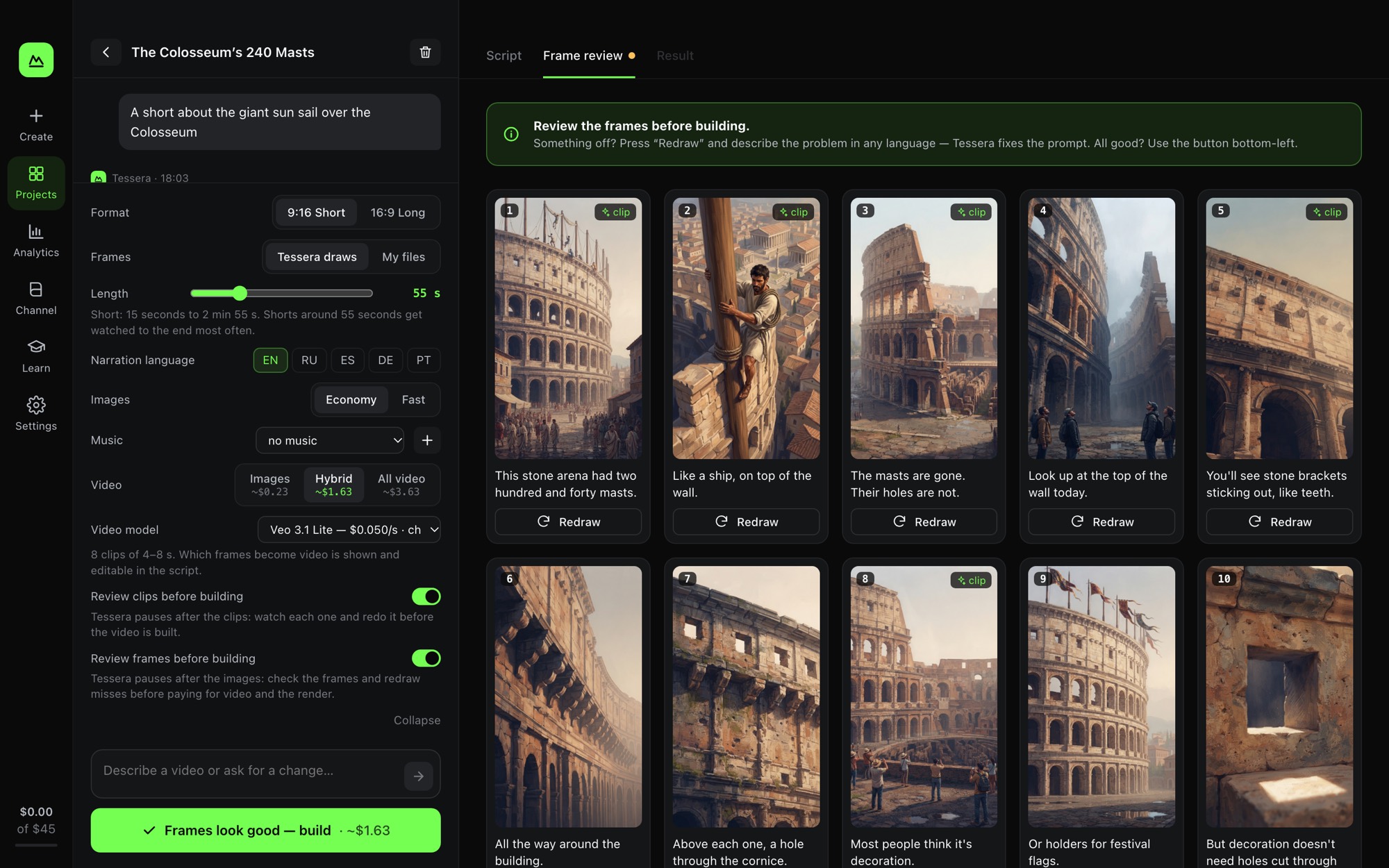
Everything a video needs, in one window
You talk to Tessera like to an editor. It does the work and shows you each step before money is spent.
Facts with sources
Before writing, Tessera searches the web and keeps the sources. No made-up numbers in your video.
A script you approve
Shorts (9:16) and 20–30 minute long videos (16:9), in your channel’s voice and rules.
Frames in your style
Every shot is drawn in one consistent style; recurring characters keep the same face. Review and redraw any frame.
Real video, not slideshows
Hybrid or all-video mode: frames come alive with Veo 3.1, Kling, Seedance or Wan. Price is on the button.
Voice, subtitles, music
Gemini or ElevenLabs narration, burned-in subtitles, your music, loudness at YouTube’s −14 LUFS.
Ready for YouTube
Title, description with chapters and sources, tags and three thumbnails for YouTube’s Test & Compare.
Series and analytics
Plan a week of videos at once; see what each video cost and which ones worked.
Several ways to create
Four modes — from the cheapest “Start” to “Cinema” with real video — or build a video from your own images and voice-over.
Your keys, your accounts
Tessera uses your own Gemini, ElevenLabs, Claude or Higgsfield keys. You pay providers directly, no markup.
How it works
Five steps. You decide at every gate; nothing paid happens behind your back.
Topic
Describe the idea in the chat — or ask Tessera for topics that fit your channel.
Facts and script
Tessera collects sources and writes the script. You edit or approve it.
Frames
All frames are drawn. You check them and redraw any miss with one sentence.
Clips
Chosen frames become video clips. Redo any clip that looks wrong.
Video
Voice, subtitles, music and render. Metadata and thumbnails are written for you.
What a video costs
Approximate cost of one finished video in each mode, paid to the AI providers from your own accounts. Tessera shows the exact price before every paid step.
Start
One key — Gemini. The simplest and cheapest way to begin.
Keys: Gemini
Optimal
A lifelike ElevenLabs narrator, everything else by Gemini.
Keys: Gemini, ElevenLabs
Maximum
The strongest scripts — by Claude. For channels where every video counts.
Keys: Claude, Gemini, ElevenLabs
Cinema
Real video instead of stills: Kling, Seedance, Wan — one Higgsfield key.
Keys: Gemini, ElevenLabs, Higgsfield
Prices are approximate: they depend on the AI models you pick and the length of the video. The app always shows the exact price before every paid step.
Security and privacy
Tessera is built so that your keys, scripts and videos stay with you.
Keys never leave your computer
Stored in the macOS Keychain or the Windows Credential Manager and sent only to the provider they belong to.
No account, no tracking
No sign-up, no analytics, no cookies. Your projects live in a folder on your disk.
Locked-down local engine
The engine listens only on 127.0.0.1 and accepts requests carrying a one-time token, so web pages can’t reach it.
Signed updates
The update notice is signed with an Ed25519 key. A tampered website can’t point Tessera to a fake download.
Honest AI labeling
Every video carries an AI-generated content note in its metadata; Tessera reminds you to tick YouTube’s disclosure.
Verifiable downloads
Each release lists its SHA-256 checksum, and this site loads no third-party scripts at all.
Questions
Do I need subscriptions?
Only a Google Gemini key with billing is required (mode “Start”). ElevenLabs, Claude and Higgsfield are optional and add a better voice, stronger scripts or more video models.
How much does one video cost?
About $0.5–2 per short and $5–15 per 20-minute long, depending on the mode — paid to the AI providers directly. A video from your own images and voice-over costs nothing. A hard monthly cap stops any paid step that would go over it.
Can I use my own images and voice-over?
Yes. Choose “My files”, drop in images or videos made anywhere and a voice-over file — Tessera times the frames to the voice and adds subtitles, camera moves, transitions and music. No text? It transcribes the voice-over itself.
Which languages?
The interface is in English and Russian. Narration: English, Russian, Spanish, German and Portuguese.
Can I monetize the videos?
Yes — the videos are yours. Follow YouTube’s rules: mark them as altered or synthetic content; Tessera reminds you on every export.
Will it run on an Intel Mac?
Not yet — the Mac version needs Apple Silicon (M1 or newer).
Where are my files?
On your disk: ~/Library/Application Support/Tessera on a Mac, %APPDATA%\Tessera on Windows. Nothing is uploaded to us.